Written from your specs AI Test Case Generator Map the coverage, then write the cases you pick Do the test once Record a Test Beta Get readable steps and Playwright + pytest scripts It can only read MCP server Let Claude, ChatGPT or Cursor read your test data Compare Test Management OracleAI Pricing Blog Docs Login Start free
Test case management

A test management tool that scales past the spreadsheet.

Hawzu is a test management tool for QA teams: a structured step editor, reusable shared steps, parameters and datasets, dynamic and hybrid suites, and a repository built for thousands of cases — as a folder tree or a resizable grid — with executions that stay in sync and a migration path off the tool you're leaving.

Hawzu test case repository — a nested folder tree of test cases with priorities, types, labels, and custom fields
The core loop

Everything test case management should be

Author cases that don't rot, organize thousands without friction, run them with the discipline a release deserves, and close the loop when a bug turns up that nothing covered — all in one place.

A step editor, not a text box

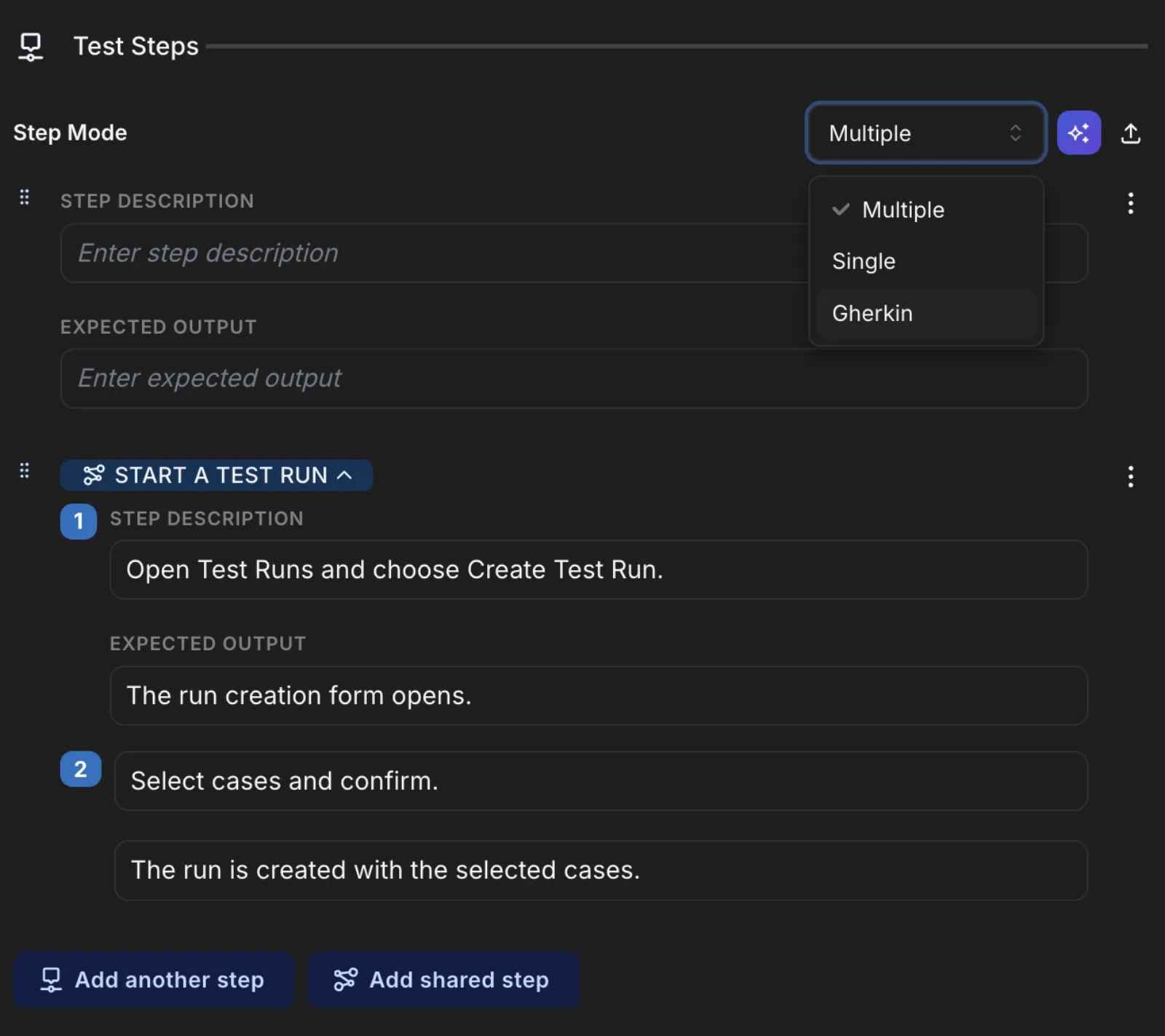
Write test cases as structured step + expected-result rows — each one rich text, with inline images and attachments, dragged into any order. Set preconditions once, and switch a case to a single freeform step or Gherkin/BDD when that fits the work better.

Shared steps — write once, reuse everywhere

Define a login or setup sequence a single time as a shared step, then reference it from any case across the project or the whole workspace. Edit it in one place and every case that uses it updates — and you can see exactly which cases those are.

Parameters & datasets — one case, every data row

Drop a parameter straight into step text, attach a dataset, and the case runs once per row with real values swapped in at execution time. Try to delete a parameter that's in use and Hawzu shows you every case and shared step it would touch before you do.

A repository built for thousands

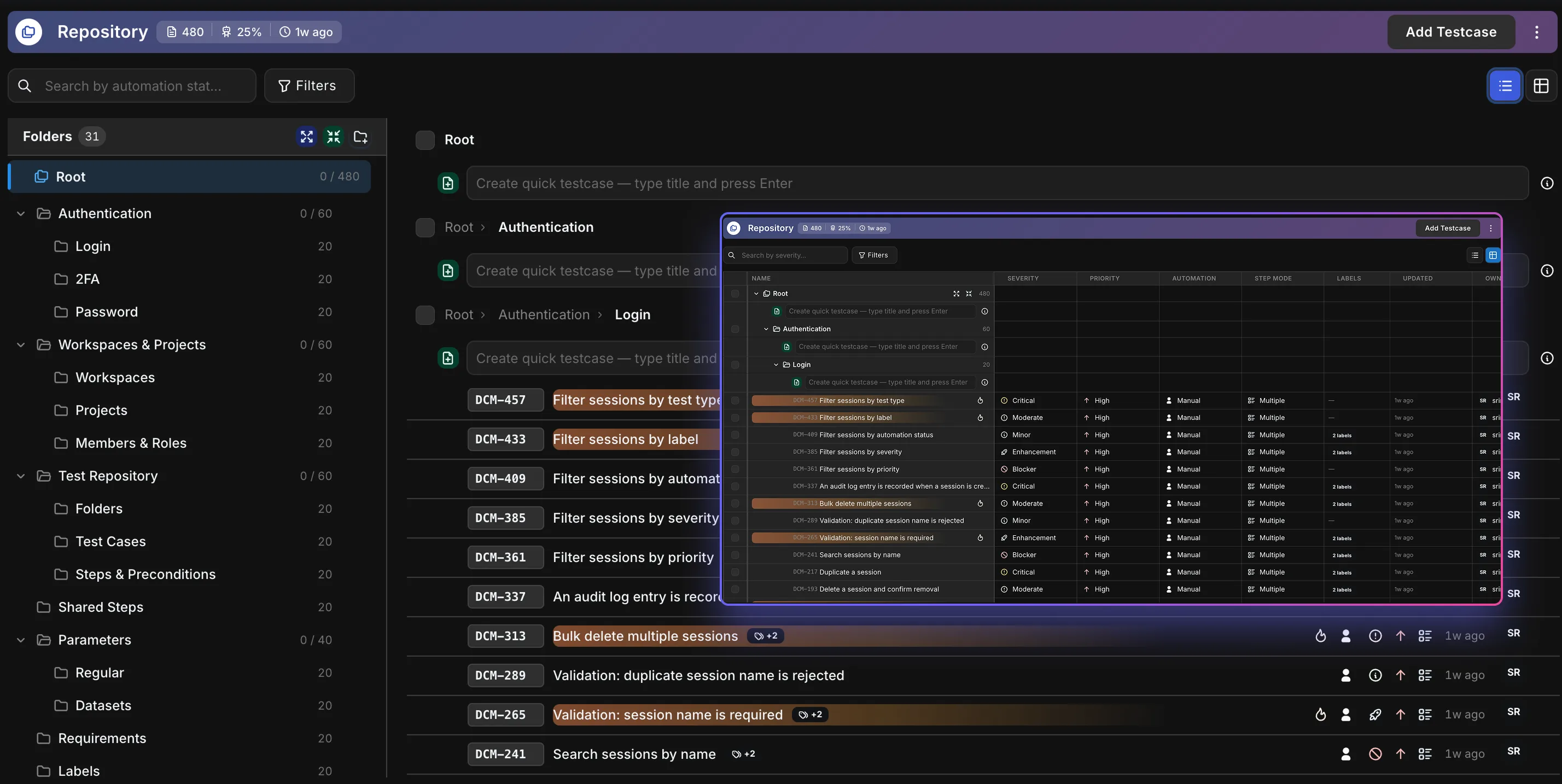
Organize everything in a nested folder tree with custom fields and labels, search and filter across it, bulk-edit or move in place, and restore anything from the recycle bin. Select what you need and spin a test run straight out of the selection, with version numbers and a field-level change history on every case.

A grid that behaves like your spreadsheet did

Switch the repository to Table view and it works the way you expect: drag columns wider, reorder them, pin the ones you always want, and add a hidden column back from the header. Your layout is saved to your account — not the browser, not the project — so it follows you everywhere.

Dynamic & hybrid suites

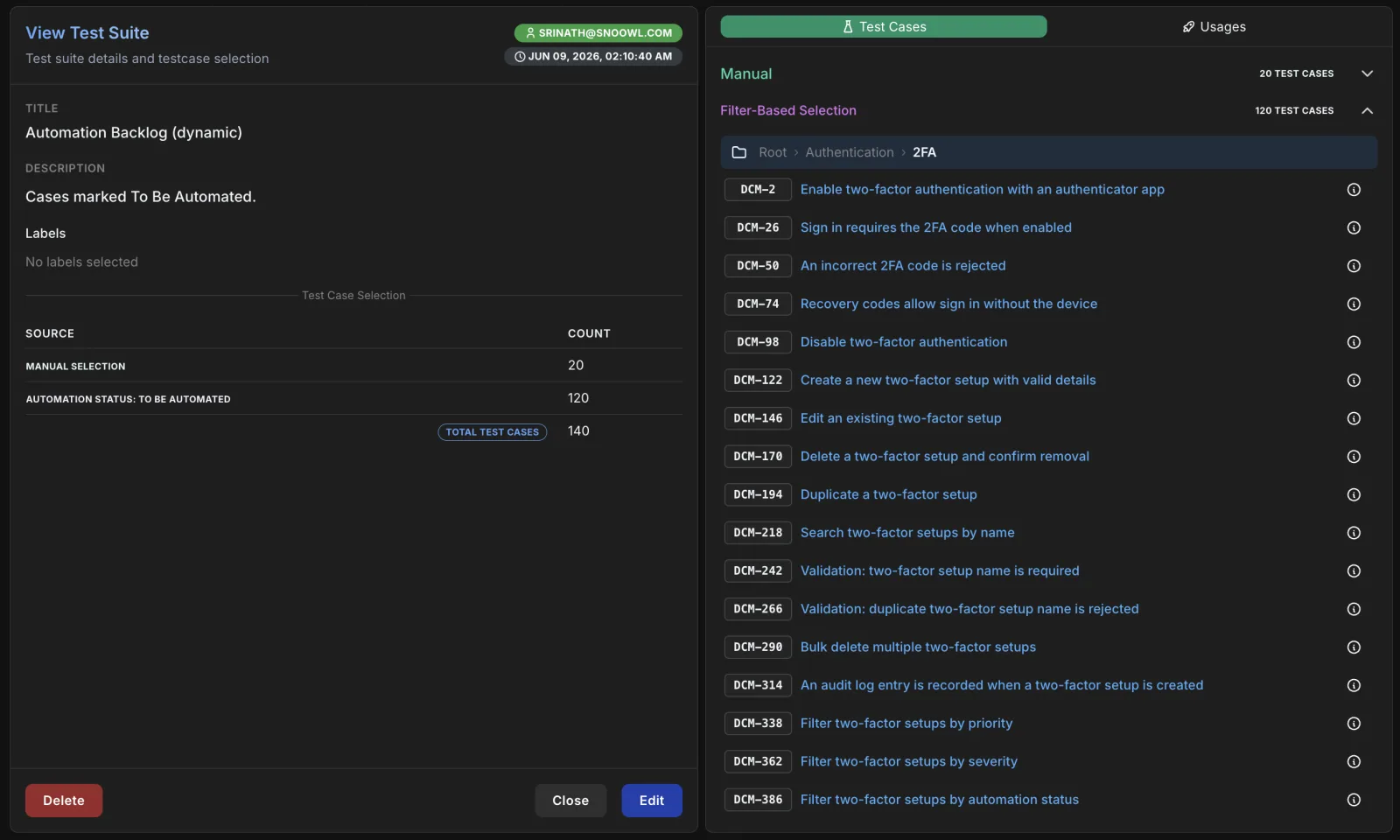
Build a suite by hand, by filter, or both. A dynamic suite is a saved query — “all high-priority checkout cases” — that re-populates itself as the repository changes, so a suite is never quietly out of date. Hand-picked cases and live filters sit in the same suite.

Know what's automated and what isn't

Automation status is a real field on every case, not a label you invent — Manual, To Be Automated, Automation In Progress, Automated. Sort the column, filter the repository down to it, search on it, and read it off a folder's stats to see which corners of the suite are still hand-run.

Run them with discipline

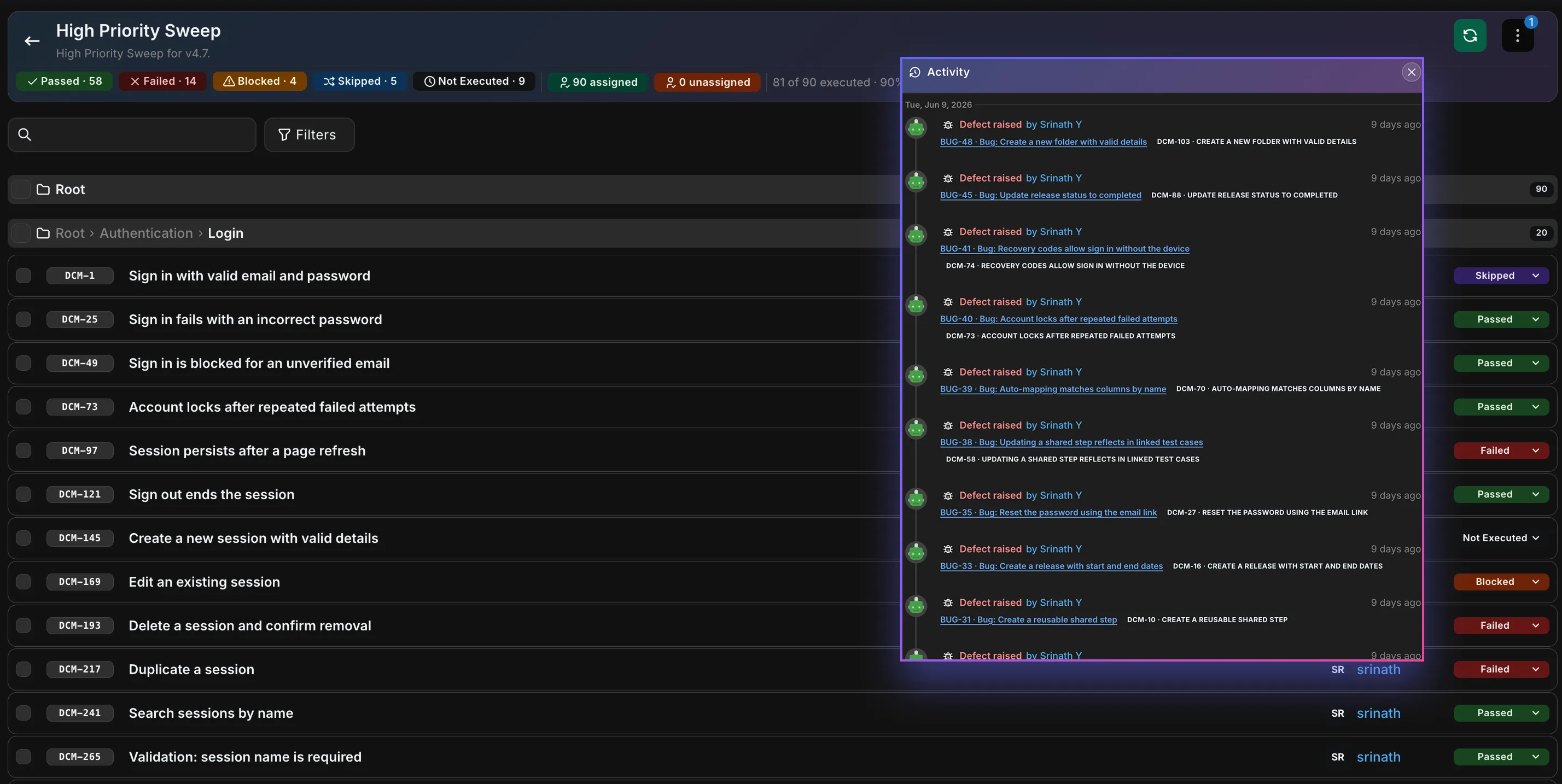
Pull cases into a test run or a release execution, then let Smart Assign hand them out to the people who know them best — who wrote a case, who ran it before, and which folders they work in. Record per-step results with evidence and time spent, and when a pulled-in case changes, Hawzu flags the drift and lets you re-sync.

Find the bugs nobody wrote a test for

A bug found once and never covered can be found again. Defect coverage gaps lists every defect with no test case linked — one tied only to a test run or a requirement still counts — filter it down by severity, and turn each into a test case in a click, pre-filled from the defect and linked back automatically.
A closer look

See it in the product

Real screens from inside Hawzu. Click through.

The repository — A folder-tree repository built for thousands of cases — custom fields, labels, bulk actions, and recycle-bin restore in one place.
A folder-tree repository built for thousands of cases — custom fields, labels, bulk actions, and recycle-bin restore in one place.
The test case editor — Structured step + expected-result rows, rich text and preconditions — with a Gherkin mode for when you want BDD.
Structured step + expected-result rows, rich text and preconditions — with a Gherkin mode for when you want BDD.
Dynamic & hybrid suites — Pick cases by hand, by filter, or both. Dynamic suites re-populate themselves as the repository changes.
Pick cases by hand, by filter, or both. Dynamic suites re-populate themselves as the repository changes.
Running an execution — Run cases in a test run or a release execution — per-step results, evidence, tester assignment, and drift detection.
Run cases in a test run or a release execution — per-step results, evidence, tester assignment, and drift detection.
Release week One shared step, forty cases

Login just moved to a new SSO screen. You fix the sequence once — in a single shared step — and the forty cases that reference it update at once. The execution already running flags the ones that drifted, and you re-sync them in a click.

  • Edited in one place 40 cases updated
  • Execution flagged the drift re-synced live
  • No copy-paste, no stale steps one edit

Your test cases stay alive — because you maintain them once.

Your cases come with you — and they can leave again.

Upload an export from TestRail, Zephyr, QASE, or a spreadsheet and Hawzu maps your priorities and types and rebuilds your folder hierarchy as it goes — all four self-serve, no migration call required. Coming from something else, ask us and we'll help. Going the other way, export a selection, a folder, or the whole project — a read-level permission, so anyone who can see the cases can take them.

Bring them in yourself
  • Excel / CSV .xlsx or .csv, mapped to your own fields
  • TestRail your export, section hierarchy intact
  • Zephyr cases in, folder paths rebuilt
  • QASE JSON, CSV or XML — suites become folders
And take them back out
  • XLSX / CSV re-importable through the same wizard
  • JSON the lossless copy
One connected system

Everything builds on the test case

The test case is the source of truth the rest of QA draws on — what you run, what fails into a defect, what a release is judged on, and what a requirement is proven by.

Before you switch

Test management tool FAQ

What is a test management tool?

A test management tool — also called test management software — is where a QA team writes test cases, organises them, runs them and tracks the results — instead of a spreadsheet that goes stale. Hawzu also connects those cases to the requirements they prove, the defects they find and the releases they are judged on, so one tool answers whether a release is ready.

What is a test case repository?

A test case repository is the shared library where a QA team keeps its test cases — organised in folders, with steps, expected results, priority and links to the requirements they check — so anyone can find, reuse and run them instead of hunting through spreadsheets. In Hawzu it's the Repository: folders and suites, shared steps and parameters for reuse, and the result history of every case across test runs.

Is there a free test management tool?

Hawzu is free for up to five people in any mix, with every feature switched on except Enterprise-only SCIM provisioning — including AI test case generation, within a monthly allowance — and up to 3 projects. Past five people, Growth is $20 per member per month billed yearly (₹1,499 in India), and you can try Growth free for 14 days without a card.

Can we move our test cases from TestRail, Zephyr, Qase or a spreadsheet?

Yes, self-serve. Upload an export from TestRail, Zephyr or Qase, or an Excel/CSV sheet, and Hawzu maps your fields and rebuilds the folder hierarchy. You can export cases back out at any time. Coming from something else? Ask us and we'll help.

Does it handle automated test results?

Yes. JUnit/xUnit, TRX, NUnit, Cucumber and Allure reports — or the REST API — record automated results into a test run, next to your manual results. They update runs; they don't create test cases. See automation.

Does it work with Jira?

Yes. When you log a defect in Hawzu you can create the issue in Jira — or GitHub, GitLab, Azure DevOps or Linear — at the same time, or link an issue that already exists, and Hawzu pulls its current status when you open the defect. It doesn't write changes back to the tracker. See integrations.

Why not just keep test cases in a spreadsheet?

A spreadsheet has no structure for steps and expected results, no reuse, and no history of what passed on which run. Hawzu gives you structured steps, shared steps and parameters reused across cases, results recorded against every run, and traceability from requirement to test to defect.

Put your test cases somewhere they'll stay alive.

A free test management tool for teams of five — every AI feature on every plan, $20 per member after, no credit card.

Talk to Us

Tell us about your QA setup. We'll get back to you within 24 hours.

Book a demo

Pick a time that works — we'll confirm by email and send a calendar invite.

Select a date

Available times

Times shown in your timezone: —