The coverage map
Quick and broad. One line per scenario, tagged with the lens it came from and the requirement it tests.
Point it at a requirement, a pasted spec, or a PDF — and by default it reads your Canon documents too. Before a single step is written, Hawzu maps up to forty scenarios — grouped by focus, scored for depth per requirement, with the requirements nothing was proposed for named on screen. You pick what's worth writing. It writes those.
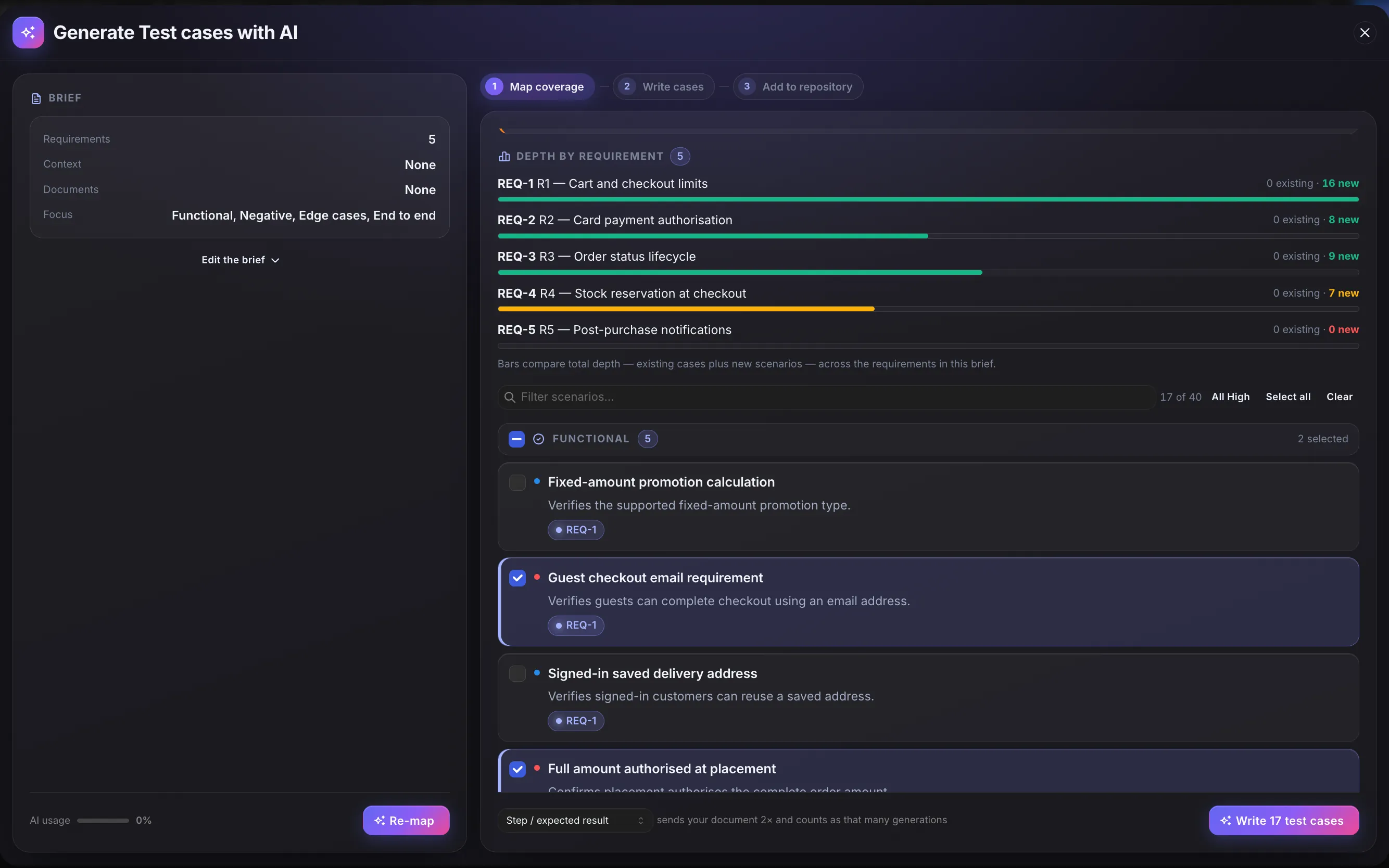
Stage one, on real requirements. Depth per requirement — and R5 reporting nothing proposed, which is the hole a list of finished test cases would never have shown you.
Ten finished test cases can't show you a hole — you'd have to already know what should have been there. Forty scenario titles can. So the map is the first thing you see, and it's the thing you approve.
Quick and broad. One line per scenario, tagged with the lens it came from and the requirement it tests.
Deep and narrow. Full steps, written only for the scenarios you ticked — with the whole source re-sent, so the steps still name real fields.
A diagram of the two stages, not a screenshot. Splitting the run in two lets you see the whole spread of scenarios before a single full test case is written.
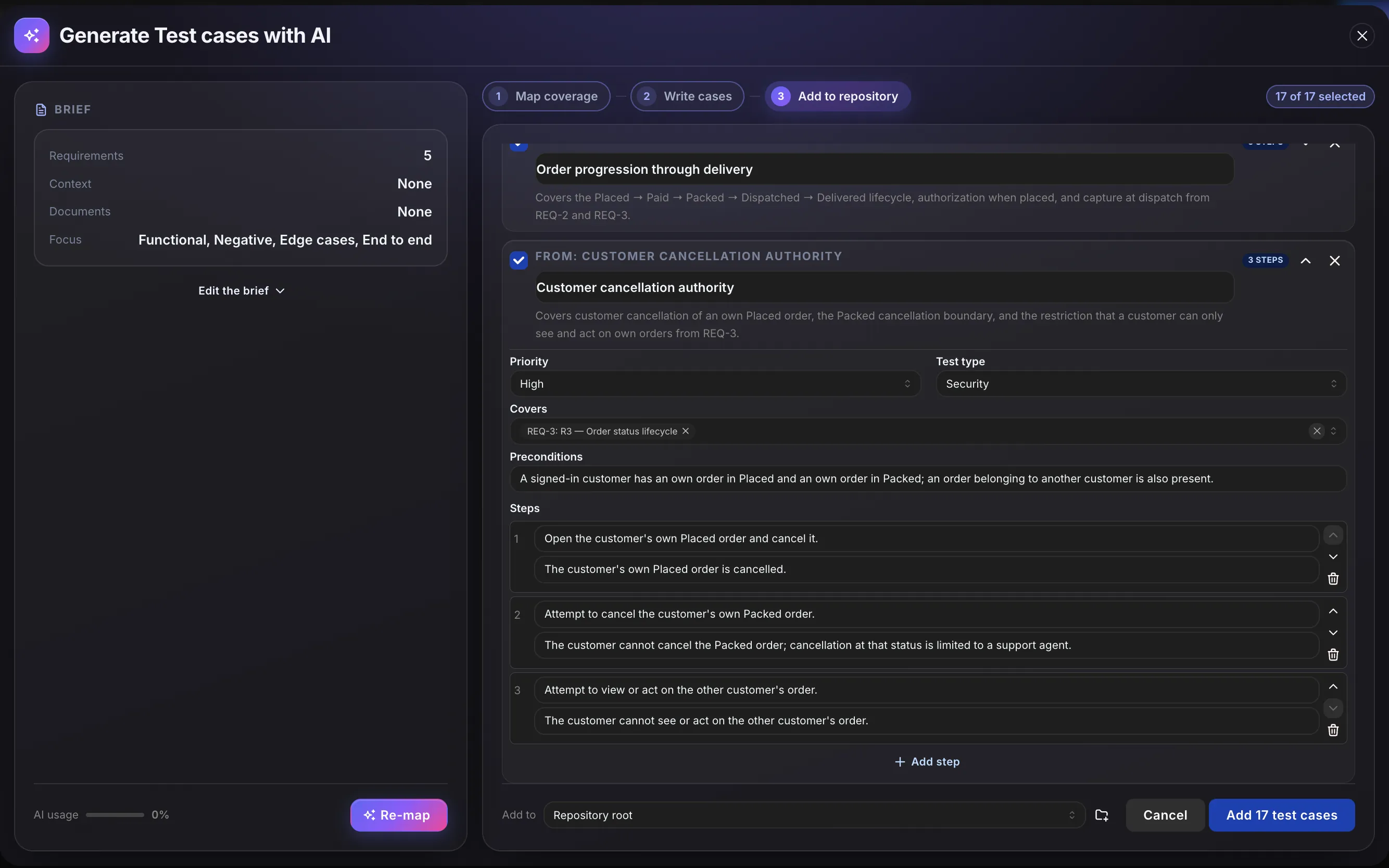
Stage two, expanded. Priority, test type, the requirement it covers, a precondition, and an expected result on every step — editable before it is saved, and nothing is written until you accept.
Machine-written tests are only worth having if a person can check them quickly. Everything here exists to make the check fast.
It starts with a quick one-line list of up to forty scenarios — enough to see what is missing. You read the map, tick what is worth writing, and only then does it write steps.
Each case is linked only to a requirement included in the run — it can't point at one you didn't give it. A case drawn from an attached document doesn't claim a requirement at all, rather than guessing.
Functional, negative, edge cases and end-to-end — plus six lenses for the things a spec assumes rather than states: state transitions, concurrency, permissions, partial failure, data integrity, and the seams with other systems.
When the source is too thin, it returns fewer scenarios and says so — instead of padding the list to the number you asked for. A short honest map beats forty plausible titles you then have to disprove one by one.
The titles already covering each requirement go into the request, so the map proposes what your suite doesn't have yet. Ask twice and you get new ground the second time, not the same twenty cases again.
Every draft is editable in place — title, priority, preconditions, each step and its expected result. Untick what you don't want. Press Add and the rest land as real, runnable test cases: coded, filed, linked to the requirement they cover, and tagged AI so anyone can see where they came from.
A requirement tells you what should happen. It rarely tells you what happens when two people do it at once, or when the payment service times out halfway through.
The second group is a single setting — Include risk analysis — and it is on by default. Turn it off when you only want what the spec states.
The rules every run follows, whoever presses Generate.
The instruction that overrides all others is to invent nothing — no field names, no error strings, no status codes, no data values that aren't in what you supplied.
Requirements the map proposed nothing for are named on screen, with the two honest explanations: the source doesn't describe them, or they're already covered.
If a source is too long to read in full, the run tells you how much of it was used — it never quietly drops the rest.
The Ground in Canon switch is on unless you turn it off for a run, so cases follow the specs and standards your team has added — and show which document they came from.
It won't create requirements, suites or releases, and it won't save a thing you haven't ticked.
You should know where the edges are before you plan around them.
The spec for Refunds v2 landed this morning as a PDF. You drop it in, tick the six requirements it relates to, leave the risk lenses on, and press Generate. Ninety seconds later you're not reading test cases — you're reading a map:
The gap on REQ-118 was the real finding. The spec never said what happens to a partial refund on a cancelled order — so nothing could.
Once you press Add they behave exactly like anything you wrote by hand — they run in executions, count toward requirement coverage, and carry the same codes, folders and history. They keep one small AI tag, so you can always find them again — there's no limbo state, and nothing to approve.
Open the Repository and choose Draft test cases with Oracle. Pick up to ten requirements, paste a spec or attach up to three documents, and Hawzu first maps up to forty scenarios. Tick the ones worth testing and it writes full test cases with steps and expected results. Nothing is saved until you accept the drafts.
Yes. Attach Word, Markdown or text files, or one PDF up to 8 MB, or paste the text. If your project has Canon documents, the generator reads those too by default, and every draft shows which document and section it came from.
It checks the test cases already linked to your requirements and skips scenarios they cover, so the map shows what's missing instead of repeating what you have.
Start from specific requirements — rules, limits and error cases, not just feature names. Review the scenario map before anything is written, because that's where gaps show. Then check each draft against its source tag before you accept it.
It's on every plan, including the free plan for five people, within a monthly AI allowance. One credit covers about twelve written test cases. See pricing.
Every AI feature on every plan. Free for five people, $20 per member after — no credit card.